Deploy your Worker and check its platform URL first. Then open Compute →
Workers → your Worker → Domains in the tenant console. You can connect an
exact hostname such as blog.example.com, or a root domain such as example.com.
Keep your current DNS provider; no nameserver delegation is required.
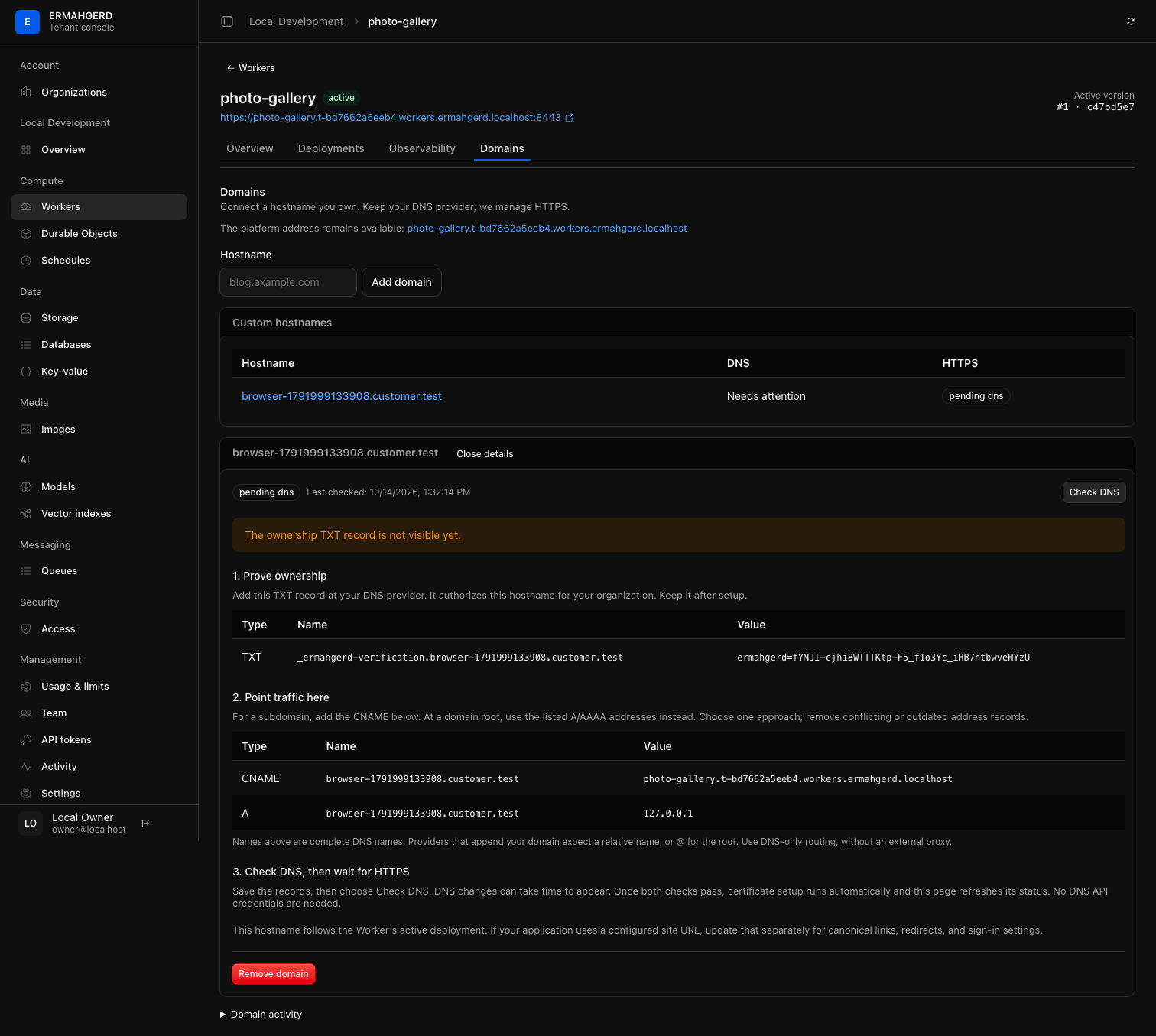
Add the hostname and DNS records
- Select Add domain and enter the hostname without
https://, a path, or a port. Open its details to see records generated for your organization. - Add the TXT ownership record exactly as shown. It authorizes this hostname for this organization; pointing at a shared IP address alone is not proof of ownership. Keep the TXT record after activation.
- Route traffic using one of the displayed alternatives:
- For a subdomain, add the CNAME pointing at the Worker’s platform hostname.
- For a domain root, add the displayed A/AAAA records instead. An ALIAS or flattened CNAME also works if its resolved addresses match the ingress. Remove conflicting records, including old AAAA records. Use DNS-only routing, not a third-party HTTP proxy.
- Select Check DNS. If the records are not visible yet, wait for your DNS provider’s changes to propagate and check again. Checks are limited to one per hostname every 30 seconds.
The records use complete DNS names. Providers that automatically append your
domain usually require a relative name: for example blog for the CNAME and
_ermahgerd-verification.blog for its TXT record. At the root, the address-record
name is usually @ and the TXT name is _ermahgerd-verification.
Wait for HTTPS
Once ownership and routing checks pass, the platform requests an exact-host certificate automatically using Certbot and HTTP-01. You do not supply DNS API credentials. The page refreshes certificate status while you leave it open; the selected hostname also survives a refresh or a shared link.
Active means a covering certificate has been published and the hostname has been added to ingress. Opening it reaches the same Worker and active deployment as its platform URL. Future Wrangler deployments and rollbacks update both addresses. The original platform URL remains available.
Certificate setup can take several minutes. If it fails, check the displayed DNS results and any CAA restrictions at your provider. The platform retries failed setup after an hour. One hostname’s failure does not block unrelated certificate requests. Certificate renewal is automatic; DNS must continue to point to the installation and its public HTTP challenge listener must remain reachable on port 80.
Application configuration and Access
A hostname mapping does not rewrite your application. If a static site or CMS has a configured site URL, update and redeploy that configuration after the hostname is active. This controls canonical links, sitemaps, absolute redirects, and application-specific sign-in settings. It is separate from DNS setup.
Access protection follows the Worker across its platform and custom hostnames. Login returns to the hostname where it began. Callbacks are limited to that Worker’s active hostnames and bound to both the browser and hostname. Session cookies remain host-only; signing in on one hostname does not create a shared cookie across unrelated customer domains.
Remove or move a hostname
Use Remove domain and confirm the hostname. This removes the route, releases the claim, and schedules its certificate for retirement. It does not delete the Worker or its data. Remove the DNS records at your provider too.
To move the hostname to another Worker, remove it and add it again on the destination. The new claim gets a new ownership token: replace the TXT record and verify again. Only one verified claim can own an exact hostname at a time. An unverified claim by another organization does not reserve your hostname.
Limits and deployment configuration
Custom domains count against the organization’s Compute → Custom domains allowance, including claims still awaiting DNS. Free includes 3, Standard 20, and Enterprise 50; operator overrides work like other resource limits. Observers can inspect setup; organization resource writers can manage it.
This first version supports exact hostnames, not wildcard aliases or path-based routes. Platform portal names and the built-in Worker/storage namespaces cannot be claimed. Organization suspension still disables the Worker’s routes.
Wrangler has a routes configuration with custom_domain: true, but that
deployment API workflow is not implemented here yet. Manage mappings in the
console; do not add Cloudflare zone declarations to work around this boundary.
Ordinary Wrangler deployments preserve the console-managed mappings.
For operators, see HTTPS and domains. Local HTTPS uses a private CA and test DNS; it does not prove public CA policy or rate-limit behavior.