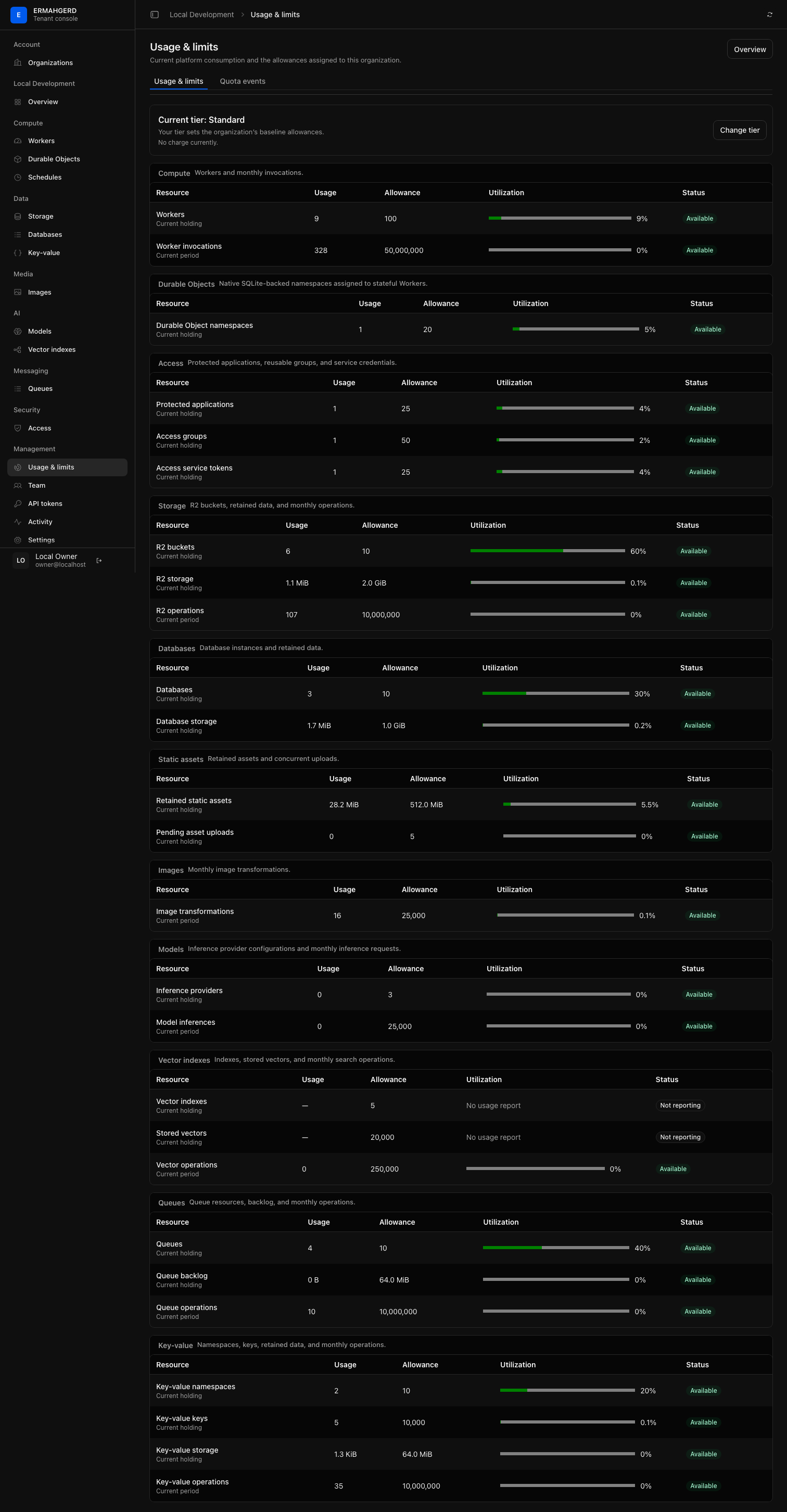
Each organization has a usage tier and its own allowances. New organizations start on Free. Owners can select Standard; Enterprise remains operator-mediated. Organization members can inspect effective limits and current usage under Management → Usage & limits. Support overrides can change individual allowances without changing the selected tier.
What is enforced
The control plane reserves organization capacity before creating a Worker or queue. Those reservations are atomic in the quota service, so two concurrent requests cannot both consume the final available slot. Failed creates release their reservation. Listing those resources reconciles the authoritative count, which repairs accounting after an interrupted operation.
Storage, queue backlog, and key-value holdings are accounted for by the services that own the durable state:
- R2 checks the current organization bucket and retained-byte limits before committing growth in its organization-scoped catalog. The platform-wide storage safety ceiling remains an upper bound even if an organization override is higher.
- Queues reserve the exact UTF-8 byte size of accepted message bodies before committing them. Delivery, expiry, dead-letter transfer, purge, and deletion release the corresponding bytes.
- The key-value service reserves namespace, live-key, and stored-value deltas before its Durable Object transaction. Replacement writes reserve only their byte delta, while deletes and TTL expiry return capacity.
Each provider publishes absolute snapshots when its durable state is first opened. Delta reservations then keep the centralized view current. A failed growth check fails closed; cleanup remains possible and causes a later authoritative reconciliation if a decrement could not be recorded immediately.
The native Durable Objects shard manager applies the same pattern to namespace holdings before a migration can add classes. Free, Standard, and Enterprise start at 3, 20, and 100 namespaces respectively. Native object count and SQLite bytes are observed for operations and tenant visibility; they are not currently presented as hard storage entitlements.
Reducing a limit below current usage does not delete tenant data. The resource is shown as over quota and further growth is rejected until usage falls below the allowance or a platform operator raises it. Deletes remain available.
Monthly usage is metered and enforced at each trusted provider boundary. Every runtime dispatch counts as one Worker invocation, including HTTP requests, service-binding calls, queue batches, and other event handlers supported by the runtime. Each authenticated R2 request counts as one R2 operation. Queue batches count each accepted message as one operation, while each key-value get, put, delete, or list counts as one key-value operation. Stable event identifiers make provider retries idempotent in the quota ledger. Each accepted native image transformation counts as one Images operation. Requests rejected by Worker ingress protection do not invoke a Worker and do not consume its invocation allowance. Observation alone does not waive normal runtime metering. Each accepted model call counts as one inference, independent of the provider’s own token accounting. Vector insert, upsert, read, search, and delete calls are metered at the vector-service boundary; index and stored-vector holdings are reconciled from its durable catalog.
The provider reserves a period operation before performing it and fails closed if the quota service is unavailable or the monthly allowance would be exceeded. Period meters therefore begin each calendar month at a known zero; Not reporting is reserved for a holding provider that has not yet published its authoritative snapshot. Worker counts, R2 buckets and retained bytes, queue counts and backlog bytes, and all key-value holding dimensions remain authoritative as well.
The shared runtime’s CPU and memory are available as capacity telemetry, but the
standalone workerd server does not currently provide usable per-Worker CPU or
memory accounting. Neither is included in tenant usage. A future CPU quota must
start with an authoritative attribution and enforcement boundary; request or
event counts are not treated as interchangeable stand-ins for compute cost.
Tier allowances
| Resource | Free | Standard | Enterprise |
|---|---|---|---|
| Workers | 10 | 100 | 250 |
| Custom domains, including pending claims | 3 | 20 | 50 |
| Durable Object namespaces | 3 | 20 | 100 |
| Databases | 3 | 10 | 25 |
| Database storage | 128 MiB | 1 GiB | 4 GiB |
| Static assets | 64 MiB | 512 MiB | 2 GiB |
| R2 buckets | 3 | 10 | 25 |
| R2 retained bytes | 512 MiB | 2 GiB | 8 GiB |
| Queues | 3 | 10 | 25 |
| Queue backlog bytes | 8 MiB | 64 MiB | 256 MiB |
| Key-value namespaces | 3 | 10 | 25 |
| Key-value keys | 1,000 | 10,000 | 50,000 |
| Key-value stored bytes | 8 MiB | 64 MiB | 256 MiB |
| Image transformations / month | 1,000 | 25,000 | 100,000 |
| Inference providers | 1 | 3 | 3 |
| Model inferences / month | 1,000 | 25,000 | 250,000 |
| Vector indexes | 1 | 5 | 20 |
| Stored vectors | 2,000 | 20,000 | 100,000 |
| Vector operations / month | 20,000 | 250,000 | 2,000,000 |
Most established period meters currently retain the same policy ceilings across tiers: 50 million Worker invocations and 10 million operations per established data primitive per calendar month. Images, Models, and Vector search use the tier-specific allowances shown above.
The console shows your effective allowances, including support overrides.
Changing your tier
Organization owners can change between Free and Standard in the tenant console: open Usage & limits, choose Change tier, review the allowances, and confirm. The review includes support overrides and highlights allowances below current usage. Changes take effect immediately; there is currently no charge. Enterprise is reserved and is not offered as a selectable tier.
No reason is required. Change history automatically records the owner, previous tier, new tier, and time. Other organization roles can see the current tier but cannot change it. API tokens and platform administrator sessions cannot change tiers either; an administrator who also owns an organization must use their tenant session.
Changing tiers preserves support overrides and existing resources. After a downgrade, growth beyond an allowance is blocked until usage is reduced; period usage resets at the start of its next accounting window.
Ask for a limit adjustment
Contact the platform operator if an individual allowance does not fit your workload. Support can set or reset an override while leaving your chosen tier intact. Those changes and quota rejections appear in your organization’s history.
For operator procedures, see Quota overrides.